> ## Documentation Index
> Fetch the complete documentation index at: https://docs.orchestra.bio/llms.txt
> Use this file to discover all available pages before exploring further.
# Release Notes 2024
Refresh your browser to see the latest product updates and bug fixes
### Portfolio export
* You can now export the **Portfolio** tab (which can be accessed from **All programs** > the **Portfolio** tab).
* Use this tab to visualize all of the programs across your portfolio.
### Updated project cost tab
The **Cost** tab on **All projects** now shows the amortized cost of tasks across projects. Previously, it only showed the total cost on the last month of the project.
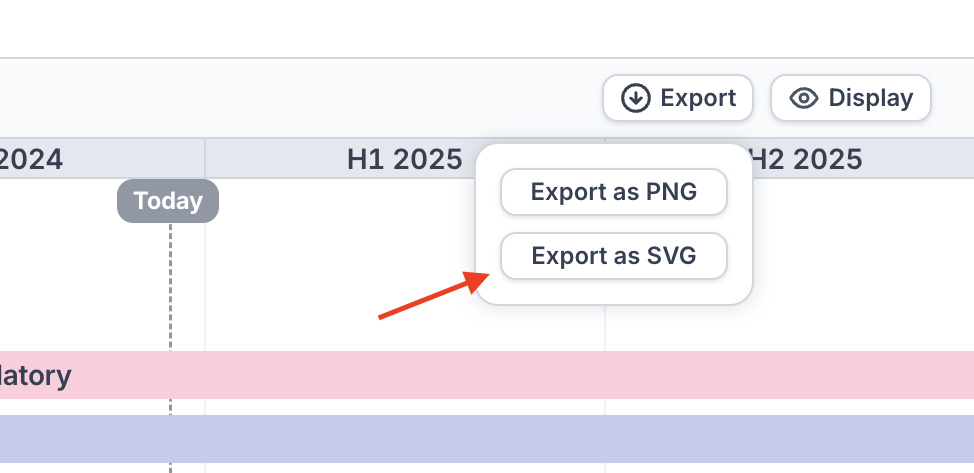
### SVG export
*Only available on non-Safari browsers*
* Certain visualizations (program summaries, program and project timelines) can now be exported as an SVG
* This allows you to import the visualization into a PowerPoint slide and make edits to the text, colors, and shapes as required
Additional manipulation and editing within PowerPoint may still be necessary.
After importing the SVG into PowerPoint
* Select the imported SVG > right-click > "Ungroup"
* Adjust the text, colors, and other elements as necessary
* Common adjustments include needing to rescale the ungrouped objects and adjusting the text size
 ### Stage summaries
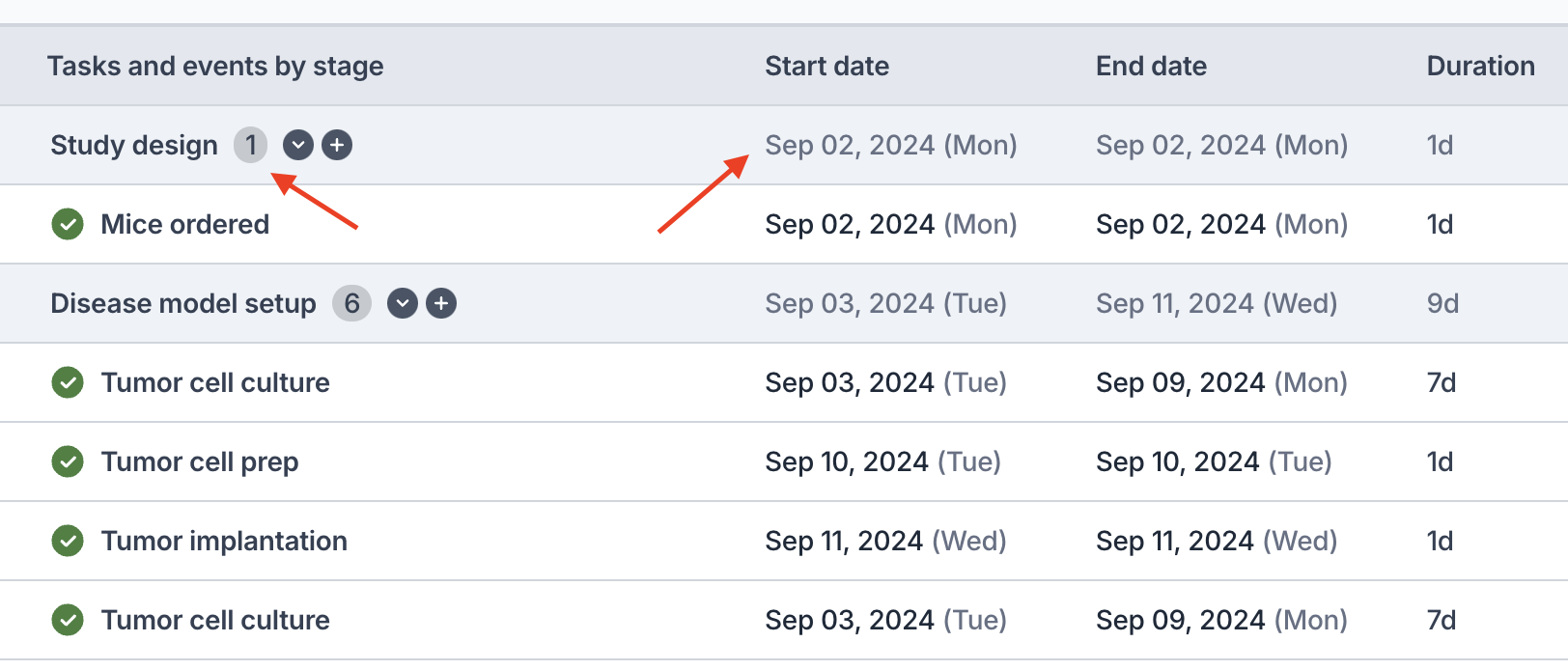
* The summary bar for a project or program stage now displays:
* The total number of items in the stage
* The earliest start date and the latest end date in the stage
* The duration (span) of the stage
* This will make it easier for you to quickly see important information about a given project or program stage
### Stage summaries
* The summary bar for a project or program stage now displays:
* The total number of items in the stage
* The earliest start date and the latest end date in the stage
* The duration (span) of the stage
* This will make it easier for you to quickly see important information about a given project or program stage
 ### Update task dates from project
* We previously implemented a feature to update the dates of an objective to match its sub-project's dates. We've now extended the feature to **tasks with sub-projects** as well.
### Performance improvements
* A variety of performance improvements throughout the product
* In particular, the **All projects** listing page now loads much faster.
### Bug fixes
* Fixed bug where the stage selection dropdown did not always work as expected when creating a new task
* Fixed bug where exporting PNGs in Safari did not always export properly
* Fixed bug where dragging and dropping tasks / objectives would sometimes reorder other tasks / objectives
* Fixed bug where Project and Program filters on All tasks / All projects were not working as expected in Saved Views
* If you previously had a Saved View with a project or program filter, you may need to remake it
### Improved datepicker
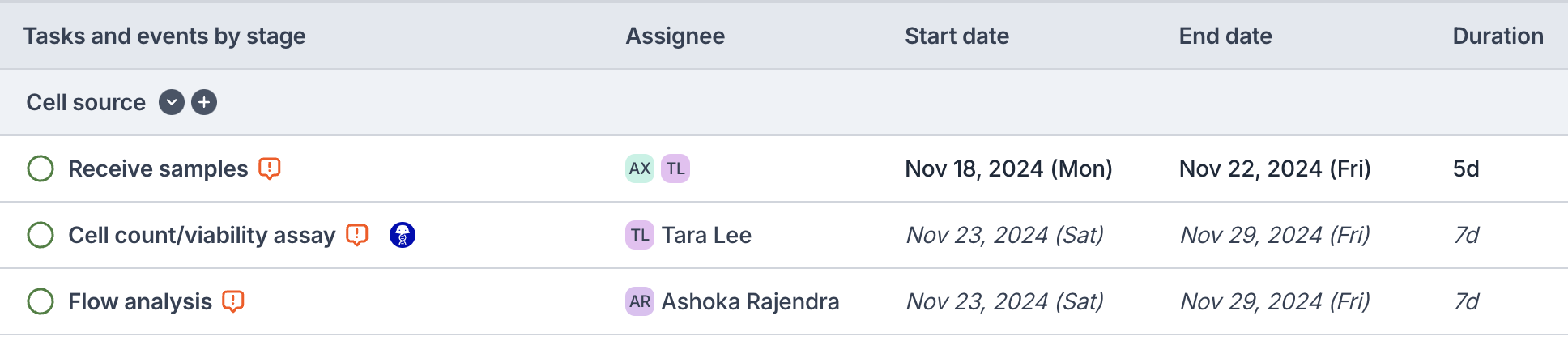
* We've made major improvements to the user experience of using the datepicker
* The datepicker is now more intuitive when updating the start date, end date, or duration
* We've replaced the icons next to the dates to represent whether the date is computed or not
* Dates in *italics* now represent calculated dates from dependencies
* Non-italicized dates indicate chosen dates or dates for tasks / objectives that are not pending
### Update task dates from project
* We previously implemented a feature to update the dates of an objective to match its sub-project's dates. We've now extended the feature to **tasks with sub-projects** as well.
### Performance improvements
* A variety of performance improvements throughout the product
* In particular, the **All projects** listing page now loads much faster.
### Bug fixes
* Fixed bug where the stage selection dropdown did not always work as expected when creating a new task
* Fixed bug where exporting PNGs in Safari did not always export properly
* Fixed bug where dragging and dropping tasks / objectives would sometimes reorder other tasks / objectives
* Fixed bug where Project and Program filters on All tasks / All projects were not working as expected in Saved Views
* If you previously had a Saved View with a project or program filter, you may need to remake it
### Improved datepicker
* We've made major improvements to the user experience of using the datepicker
* The datepicker is now more intuitive when updating the start date, end date, or duration
* We've replaced the icons next to the dates to represent whether the date is computed or not
* Dates in *italics* now represent calculated dates from dependencies
* Non-italicized dates indicate chosen dates or dates for tasks / objectives that are not pending
 ### Sync Objective dates to project dates
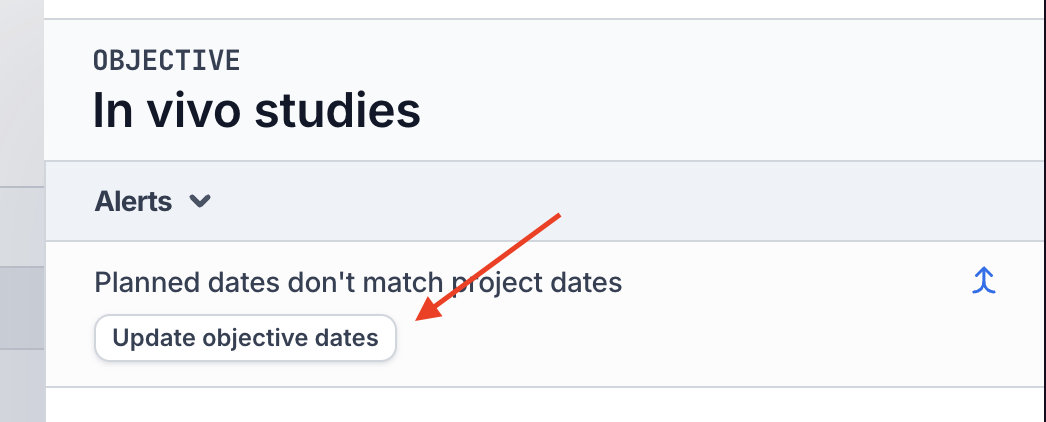
* We understand that building out a project is sometimes used to determine the Objective's "planned dates"
* If the Objective's "planned dates" do not match its project's dates, you can now click the **Update objective dates** to update the objective's dates
* The same feature is available for updating planned objective costs
### Sync Objective dates to project dates
* We understand that building out a project is sometimes used to determine the Objective's "planned dates"
* If the Objective's "planned dates" do not match its project's dates, you can now click the **Update objective dates** to update the objective's dates
* The same feature is available for updating planned objective costs
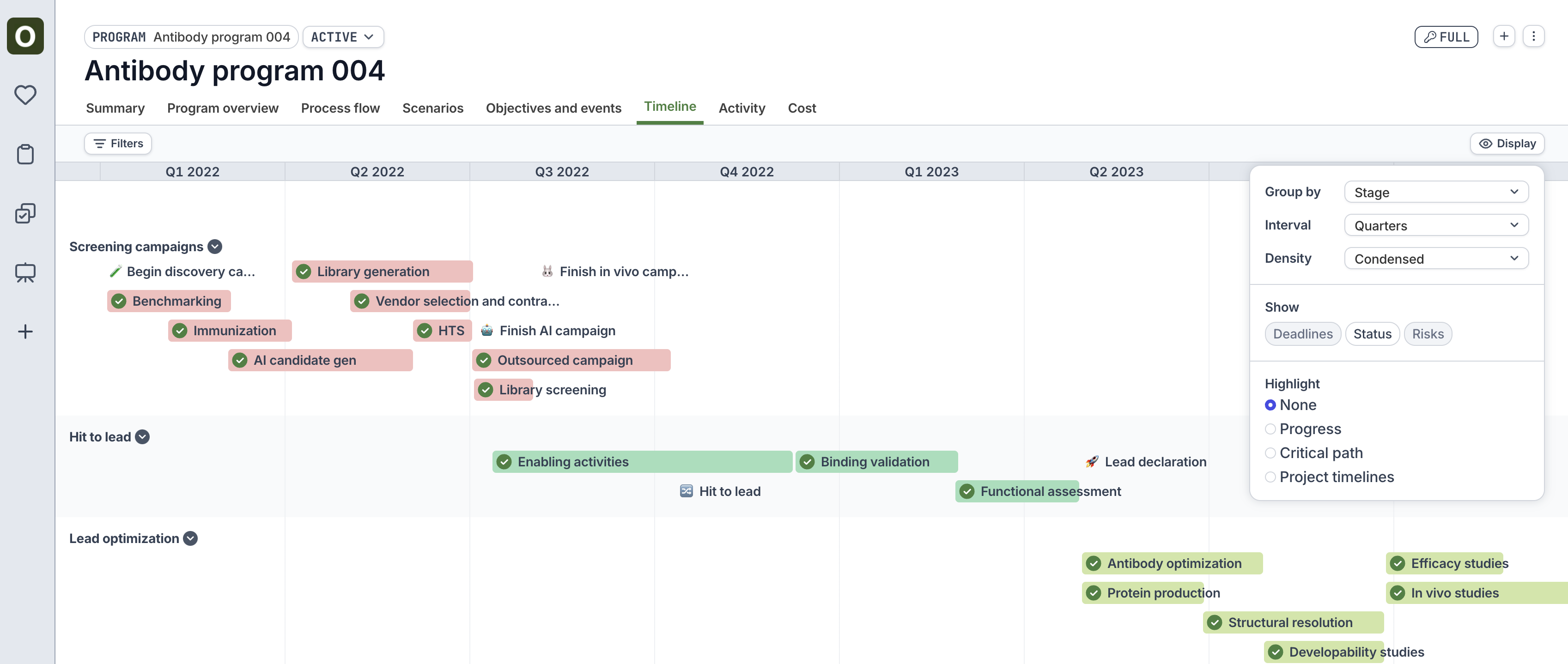
 ### Project timeline redesign
* For an individual project, view the **Timeline** tab to see the cleaner timeline design that we have rolled out.
* This timeline offers more customization options (use the **Display** button at the top right) to view the tasks in a project
### Bug fixes
* Fixed bug where bulk deleting tasks from a duplicated project caused errors
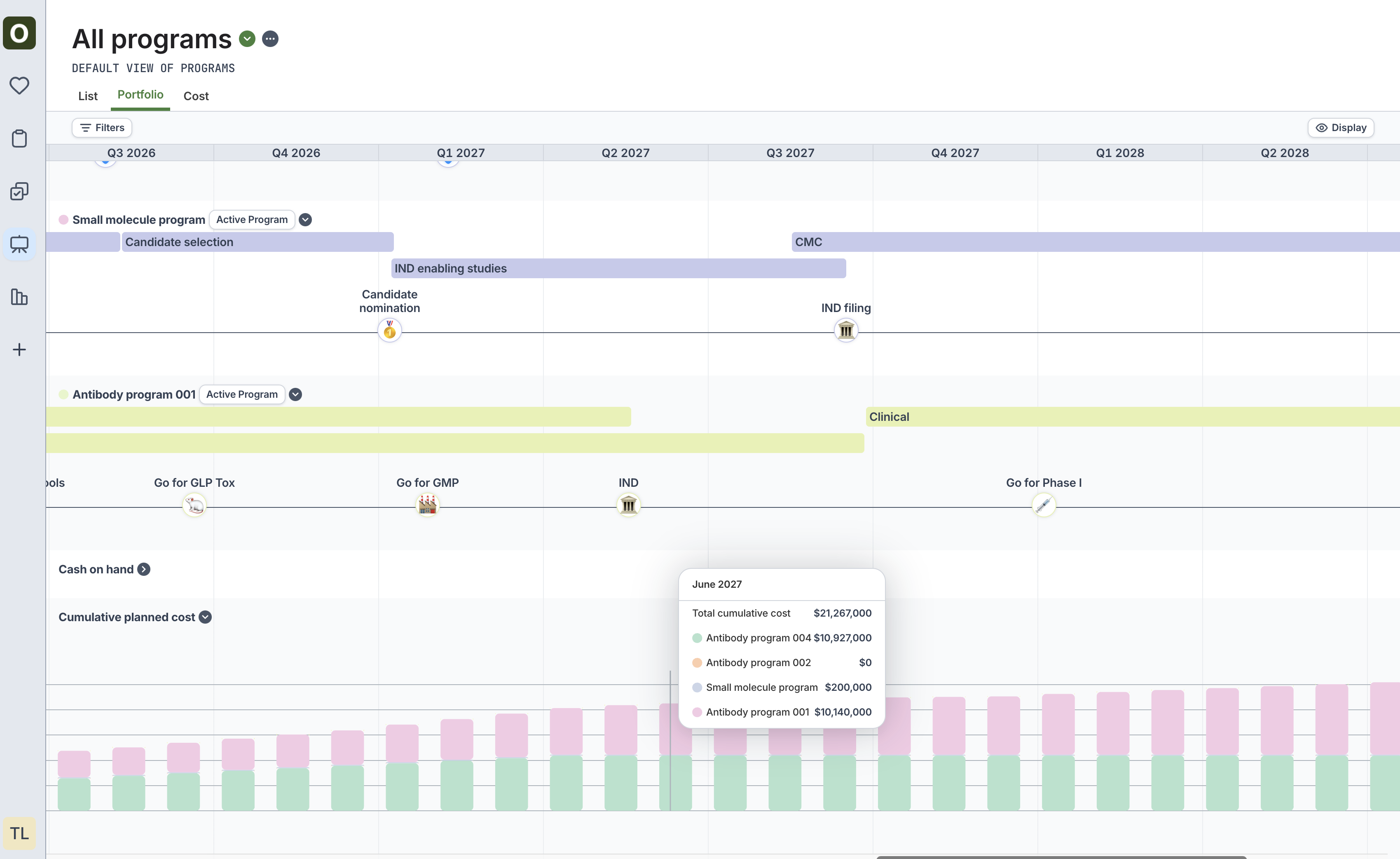
### Portfolio tab on programs
New "Portfolio" tab on Programs allows users to toggle between program scenarios to view all programs' stage and key event data at once
* See cumulative cost and breakdown of that cost at a given time
* Pick a scenario from the program selector to see how different permutations of scenarios can affect cash and cost
### Project timeline redesign
* For an individual project, view the **Timeline** tab to see the cleaner timeline design that we have rolled out.
* This timeline offers more customization options (use the **Display** button at the top right) to view the tasks in a project
### Bug fixes
* Fixed bug where bulk deleting tasks from a duplicated project caused errors
### Portfolio tab on programs
New "Portfolio" tab on Programs allows users to toggle between program scenarios to view all programs' stage and key event data at once
* See cumulative cost and breakdown of that cost at a given time
* Pick a scenario from the program selector to see how different permutations of scenarios can affect cash and cost
 ### Program timeline redesign
The new program timeline view now allows users to choose stacked vs. condensed for a more customized view of the timeline
### Program timeline redesign
The new program timeline view now allows users to choose stacked vs. condensed for a more customized view of the timeline
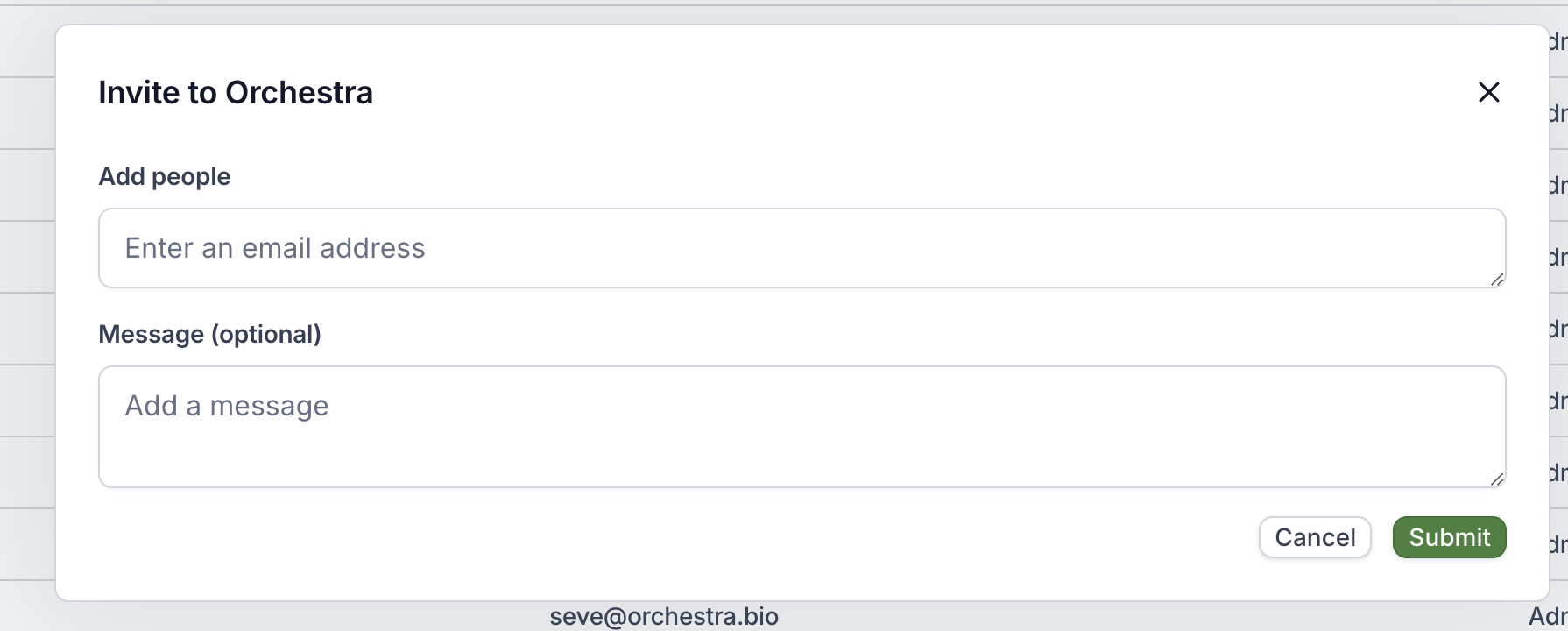
 ### External collaborators
* External collaborators can now be invited to your Orchestra organization by organization admins
* See [User management](/advanced/user-management) for more information
### External collaborators
* External collaborators can now be invited to your Orchestra organization by organization admins
* See [User management](/advanced/user-management) for more information
 ### Bug fixes
* Fixed a bug to accurately display the duration on the project preview card from a task or objective
### Tag categories
* Tag categories are now available to more easily organize your organization's tags.
* Manage your tags via the Organization Settings page (only available to Admins).
### Objective sidepanel now displays Project metadata
* This allows you to more easily see if dates or status are mismatched
* Project now includes % complete, which is a time-weighted calculation of the completed tasks within a project
* Additionally, you can toggle on Objective metadata from the Project Overview tab to see side-by-side date and cost information
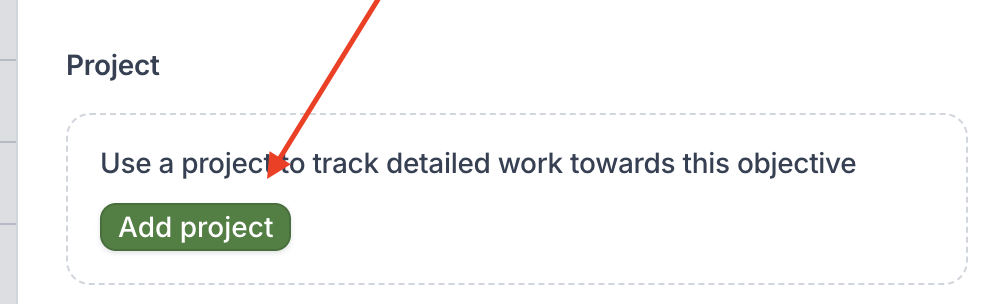
### Improved UX for attaching project to Objective
* We updated the wording of the options to make it more clear
* We now include an option to "Create a new copy of an existing project"
### Bug fixes
* Fixed a bug to accurately display the duration on the project preview card from a task or objective
### Tag categories
* Tag categories are now available to more easily organize your organization's tags.
* Manage your tags via the Organization Settings page (only available to Admins).
### Objective sidepanel now displays Project metadata
* This allows you to more easily see if dates or status are mismatched
* Project now includes % complete, which is a time-weighted calculation of the completed tasks within a project
* Additionally, you can toggle on Objective metadata from the Project Overview tab to see side-by-side date and cost information
### Improved UX for attaching project to Objective
* We updated the wording of the options to make it more clear
* We now include an option to "Create a new copy of an existing project"
 ### Performance improvements
We improved performance throughout the Orchestra product.
### Bug fixes
* Fixed bug where we were incorrectly showing a "risk" when the end date of the objective was the same as the end date of the project
* Horizontal scroll bar is now present without needing to scroll all the way to the bottom of the page
* Duplicating tasks now works properly in the expanded Objective's "Project tasks and events" tab
* "Won't Do" is now included in all status filters
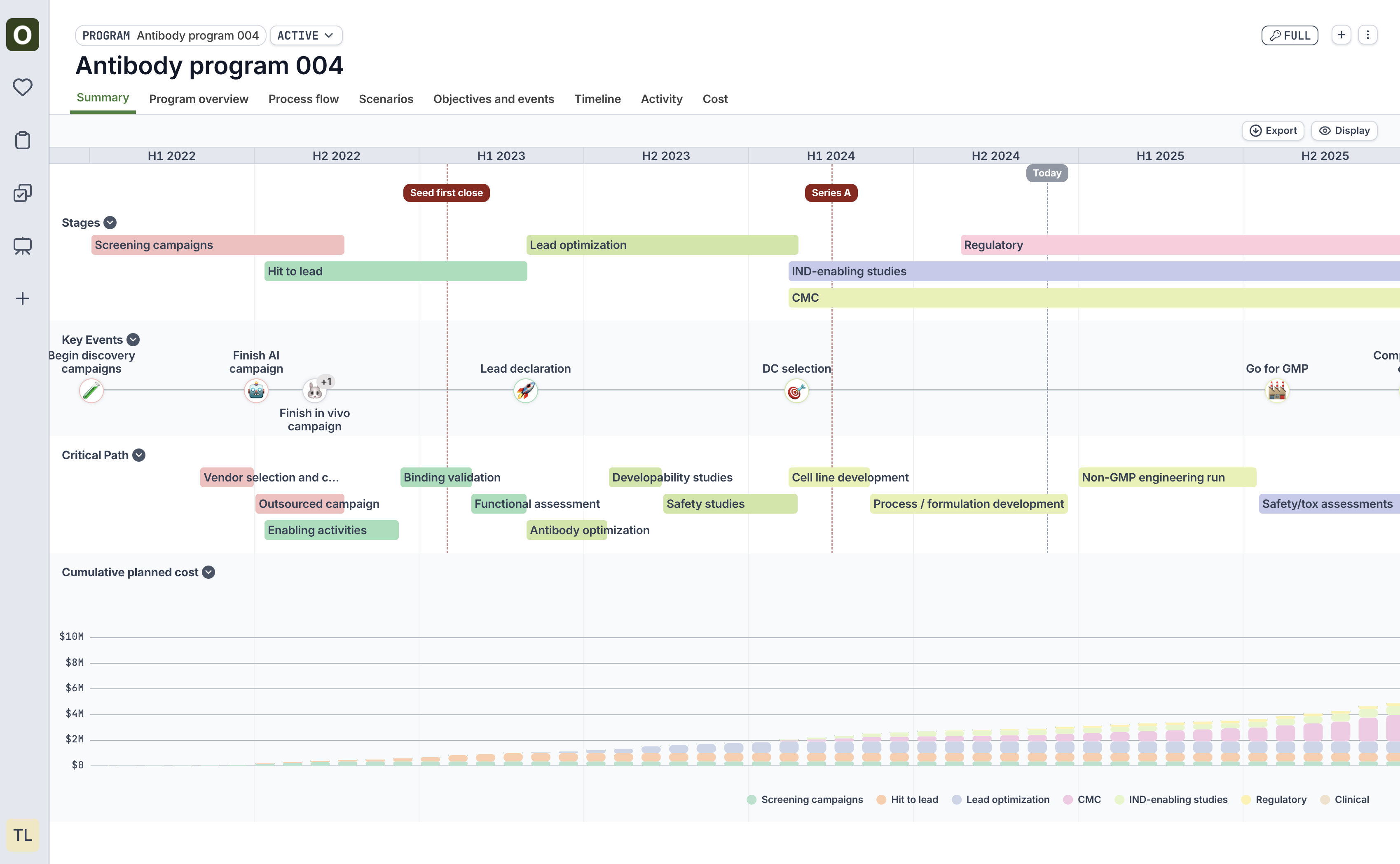
### Visualization improvements
* Major visual improvements to program summary charts
* Cost charts are now displayed on program scenarios as well as the program summary tab
### Performance improvements
We improved performance throughout the Orchestra product.
### Bug fixes
* Fixed bug where we were incorrectly showing a "risk" when the end date of the objective was the same as the end date of the project
* Horizontal scroll bar is now present without needing to scroll all the way to the bottom of the page
* Duplicating tasks now works properly in the expanded Objective's "Project tasks and events" tab
* "Won't Do" is now included in all status filters
### Visualization improvements
* Major visual improvements to program summary charts
* Cost charts are now displayed on program scenarios as well as the program summary tab
 ### Assign tasks to multiple users
Filters for "All tasks" can be adjusted to account for multiple assignees as well.
### Bulk set stage and tags
* Bulk set Stage on tasks within a project
* Bulk set Tags on tasks within a project
### Bug fixes
* Users can now properly update the method of a task after removing a fulfillment project
* Notification emails are now properly sent to users when they are marked as the assignee of a task
* When creating a new task, the modals to add "repeats" and "tags" are no longer cut off
* Tags now properly save upon task creation
### Assign tasks to multiple users
Filters for "All tasks" can be adjusted to account for multiple assignees as well.
### Bulk set stage and tags
* Bulk set Stage on tasks within a project
* Bulk set Tags on tasks within a project
### Bug fixes
* Users can now properly update the method of a task after removing a fulfillment project
* Notification emails are now properly sent to users when they are marked as the assignee of a task
* When creating a new task, the modals to add "repeats" and "tags" are no longer cut off
* Tags now properly save upon task creation